

Pinterest keyword research is one of the most important things you can learn if you want to use Pinterest to drive traffic to your blog. But if you’re new to Pinterest SEO, it can feel a little overwhelming at first. What keywords should you use? Where do you find them? And how do you know if people are actually searching for them?
Disclosure: This post may contain affiliate links. If you decide to make a purchase through one of my links, I may earn a commission at no extra cost to you. Please read my disclaimer for more information.
Why Pinterest Keyword Research Matters
I know that feeling because I didn’t start out knowing all of this either. I’ve been blogging for years, and I’ve had a couple of blogs before Bosslady Ingrid. In fact, I was a complete beginner when I started my first blogs. I had no tech experience, no real writing experience, and I had a lot to learn about digital marketing. Looking back, I definitely made mistakes that cost me time. A lot of time.
Fast forward to today, and Pinterest has become an important part of how I get my content in front of people. I don’t just create a pretty Pin and hope someone finds it. Before I create my Pins, I want to know what people are actually searching for and which keywords make sense for my content.
That’s why Pinterest keyword research has become such an important part of my Pinterest strategy. It helps me create content around topics people are already interested in instead of simply guessing what might work.
Who Can Use Pinterest Keyword Research?
In this post, I’ll mainly talk about Pinterest keyword research from a blogger’s perspective, because that’s how I personally use Pinterest to get more eyes on my blog content. But you don’t have to be a blogger to benefit from Pinterest keyword research.
Pinterest marketers, website owners, content creators, online businesses, and anyone using Pinterest to reach an audience can use the same strategy. You can use keyword research to find content ideas, understand what your audience is searching for, create more discoverable Pins, or see what topics and keywords are already performing well.
So, even though most of my examples in this guide will focus on using Pinterest to drive traffic to a blog, the basic strategy can be applied to almost any type of Pinterest account.
The idea is simple: find out what people are searching for, then create content that gives them what they’re looking for.

How Pinterest Keywords Can Help You Get Discovered
If you’re using Pinterest to promote a blog, your goal isn’t just to create beautiful Pins. You want the right people to actually find them.
That’s where keywords come in.
Pinterest works much more like a search engine than many people realize. Someone types a phrase into the search bar because they’re looking for an idea, an answer, a product, a recipe, a tutorial, or something else they need. Your job is to make it as easy as possible for Pinterest to understand what your content is about.
In this guide, I’ll show you how Pinterest keywords work, how I find them, where you should use them, and how you can use keyword research to create Pins that have a better chance of being discovered. I’ll also show you the Pinterest keyword research tool I personally use, PinClicks, and why I find it so useful when I’m researching keywords for my blogs.
And don’t worry, you don’t need to be a Pinterest expert or spend hours staring at spreadsheets to get started. Once you understand what you’re looking for, Pinterest keyword research becomes much easier. Let’s get into it.
What Is Pinterest Keyword Research?
Before we get into finding the best Pinterest keywords, let’s take a step back for a minute. If you’ve never done keyword research before, the term can sound a lot more complicated than it actually is.
Pinterest keyword research simply means finding the words and phrases people are actually typing into the Pinterest search bar when they’re looking for something.
Think about it from the reader’s point of view.
Let’s say someone wants to find an easy dinner recipe. She might open Pinterest and search for “easy dinner recipes.” Someone else might be planning a bathroom makeover and search for “small bathroom ideas” or “bathroom renovation on a budget.”
Those search phrases are keywords.
As a blogger, you want to understand what your audience is searching for so you can create content that matches those searches. Then, you can use relevant keywords in your Pinterest profile, boards, Pin titles, and Pin descriptions to help Pinterest understand what your content is about.
And this is where things get interesting.
You don’t always have to guess what people are searching for. Pinterest gives you clues, and there are also keyword research tools that can give you much more information about the keywords you’re considering.
Why Pinterest Keywords Matter
If you’re using Pinterest to get traffic to your blog, you don’t want to create Pins based only on what sounds good to you. You want to create content around topics your audience is actually interested in.
Let’s say you’ve written a blog post called “10 Easy Sewing Projects for Beginners.” You might immediately think your main keyword is “sewing projects.” And that’s a good starting point. But what else might your reader search for?
She might search for:
- easy sewing projects
- sewing projects for beginners
- beginner sewing projects
- simple sewing projects
- easy things to sew
- beginner sewing ideas
These phrases are closely related, but they don’t all have exactly the same search intent.
That’s why I like to do a little research before creating my Pins. Instead of picking one keyword and using it everywhere, I can look at the bigger picture and find related phrases that make sense for my content.
This also gives me ideas for future blog posts. One keyword can lead you to several related topics that your audience might be interested in.
Think Beyond One-Word Keywords
One thing that’s important to understand is that a Pinterest keyword doesn’t have to be a single word. In fact, longer and more specific search phrases can be incredibly useful.
For example, “recipes” is very broad. Someone searching for that could be looking for almost anything. But “easy healthy dinner recipes for busy moms” tells you much more about what that person is looking for.
These longer phrases are often called long-tail keywords. They can give you a much better idea of the specific topic, problem, or solution someone is searching for. And you don’t necessarily have to choose between broad and long-tail keywords. You can use both as part of your Pinterest SEO strategy.
A broad keyword can help you understand the overall topic, while related and more specific keywords can help you create content that targets a particular search.
Think Like Your Pinterest Reader
This is one of the simplest ways to get better at Pinterest keyword research: stop thinking like a blogger for a moment and start thinking like the person you’re trying to reach.
Imagine you’re searching Pinterest for an answer to a problem. What would you actually type into the search bar?
If you’re looking for sewing inspiration, you might search for “easy sewing projects”; if you’re planning your next DIY project, maybe you’d search for “beginner sewing projects,” and if you’re looking for something you can make in an afternoon, you might search for “quick sewing projects.”
All three searches are about sewing projects, but the person behind each search is looking for something slightly different. That’s really the goal of Pinterest keyword research: finding the language your audience is already using and connecting it to the content you’re creating.
Once you start looking at Pinterest this way, creating Pins becomes much less of a guessing game. Instead of asking yourself, “What should I write on this Pin?”, you can start with a much better question:
“What is my audience already searching for?”
That’s the question I want you to keep in mind as we move on to actually finding Pinterest keywords.

How to Find Pinterest Keywords
Now that you understand what Pinterest keywords are and why they matter, let’s talk about the part you can actually put into practice: finding them. And you don’t need an expensive tool to get started. Pinterest itself can give you quite a few clues about what people are searching for.
One of my favorite ways to start is simply by using the Pinterest search bar.
Start With a Broad Pinterest Keyword
Let’s say you have a food blog and you’ve written a blog post about St. Patrick’s Day desserts. That’s your starting keyword. Go to Pinterest, type “St. Patrick’s Day desserts” into the search bar, and take a look at what Pinterest suggests.
You may see related searches such as:
- easy St. Patrick’s Day desserts
- healthy St. Patrick’s Day desserts
- St. Patrick’s Day desserts for kids
- traditional St. Patrick’s Day desserts
- green St. Patrick’s Day desserts
These suggestions are incredibly useful because they’re based on searches happening on Pinterest. They can give you ideas for keywords to use in your Pin, but they can also give you ideas for future blog posts.
For example, if you notice that people are searching for “St. Patrick’s Day desserts for kids,” you could create a separate post specifically around that topic.
This is one of the reasons I don’t like to create my Pinterest content completely from scratch every time. There is already so much information available about what people are looking for. You just have to know where to look.
Look for Related Pinterest Keywords
Once you’ve found a few related keywords, don’t stop there. Take one of those phrases and search for it again.
For example, you could take “easy St. Patrick’s Day desserts” and put that into Pinterest. You may discover even more specific searches. This can help you build what I like to think of as a little keyword family.
You start with your main topic:
St. Patrick’s Day desserts
Then you find related searches:
easy St. Patrick’s Day desserts
St. Patrick’s Day desserts for kids
healthy St. Patrick’s Day desserts
And from there, you can find even more specific phrases. You don’t need to use every single keyword you find. That’s actually a mistake I see people make when they first start learning Pinterest SEO.
Your goal isn’t to stuff as many keywords as possible into one Pin. Your goal is to understand what people are searching for and choose the keywords that are most relevant to your particular piece of content.
Use Pinterest to Find Content Ideas Too
Here’s another reason I love doing keyword research before creating content: sometimes your keyword research can tell you what to write about next.
Let’s say you’re a sewing blogger and you start with “beginner sewing projects.”
During your research, you discover that people are also searching for things like “easy sewing projects to sell,” “simple sewing projects for beginners,” and “sewing projects for kids.”
Suddenly, you have more than just keywords. You have potential blog post ideas!
This is especially useful when you have a blog and you’re trying to build up a library of content. Instead of sitting in front of a blank screen wondering what to write about next, you can use Pinterest search behavior to help guide your content planning.
And this is where keyword research becomes much more than an SEO task. It can actually help you understand your audience better.
But Pinterest Search Doesn’t Tell You Everything
There is one limitation to using Pinterest’s search bar on its own. Pinterest suggestions can show you what people are searching for, but they don’t give you all the information I want when I’m deciding which keywords to target.
If I’m researching a topic for one of my blogs, I also want to know things like how much search activity a keyword has, what related keywords are worth looking at, and what kind of Pins are already performing well for that topic.
That’s when I move beyond Pinterest’s search bar and use a dedicated Pinterest keyword research tool. And this is where PinClicks comes into my own workflow.
Why I Use PinClicks for Pinterest Keyword Research
I’ve used Pinterest for my blogs for quite a while, and I don’t want my keyword research to be based entirely on guesswork. I want to be able to dig a little deeper before I spend time creating new content and multiple Pins for it.
That’s one of the reasons I use PinClicks (you can try it for free here).
It gives me a much bigger picture when I’m researching a keyword. Instead of simply seeing a few suggestions underneath the Pinterest search bar, I can research keywords in more detail and see which related terms are worth looking at.
For me, this is especially helpful because I create content regularly. When you’re only creating a Pin every now and then, doing everything manually may be perfectly fine. But when Pinterest is an important part of your blog traffic strategy, saving time becomes pretty valuable.
I’ll show you exactly how I use PinClicks for keyword research in a moment. But first, let’s look at what you should actually be looking for when you find a Pinterest keyword.
That’s where things get a little more interesting.
How to Choose the Right Pinterest Keywords
Finding Pinterest keywords is one thing. Knowing which ones are actually worth using is another.
When I first started learning about Pinterest SEO, I thought the process was basically about finding a keyword and adding it to my Pin. But there’s a little more to it than that.
You want your keywords to be relevant to your content, match what your audience is looking for, and have enough search activity to make them worth targeting. You also don’t want to choose a keyword just because it has a lot of searches. A keyword can have a huge audience and still be a poor choice for your particular blog post.
Start With Relevance
This might sound obvious, but it’s one of the most important things to remember. Your Pinterest keyword needs to match the content you’re actually sharing.
If you’ve written a blog post about easy sewing projects for beginners, you don’t want to target a popular keyword like sewing patterns simply because it gets more searches.
Someone searching for sewing patterns could be looking for something completely different from what your post offers.
Instead, look for keywords that describe your content accurately, such as: easy sewing projects, sewing projects for beginners, or simple sewing projects.
The right keyword isn’t necessarily the biggest keyword. It’s the one that connects your content with the right person.
Look at Search Volume
Once you’ve found relevant keywords, it’s useful to look at search volume.
Search volume gives you an idea of how many people are searching for a particular keyword. The more people searching for a topic, the more potential there is for your content to be discovered.
But don’t fall into the trap of thinking that more searches always means better.
A keyword with a huge search volume can also be very broad and competitive. A more specific keyword with fewer searches might bring you visitors who are much more interested in what you actually offer.
For example, “sewing” is incredibly broad. Someone searching for it could be looking for sewing machines, sewing patterns, sewing classes, fabric, clothing inspiration, tutorials, or just about anything else related to sewing.
Compare that with “easy sewing projects for beginners.” Now you have a much clearer idea of what the person is looking for. That’s why I like to look at the bigger picture rather than choosing a keyword based on one number.
Pay Attention to Search Intent
Search intent simply means understanding why someone is searching for a particular phrase. And this is something I think bloggers sometimes overlook.
Imagine someone searches for “Pinterest marketing.” They’re looking for a broad topic and could be interested in almost anything from Pinterest SEO to scheduling tools. But someone searching for “how to get blog traffic from Pinterest” has a much more specific goal.
They’re looking for a solution to a problem. When you understand that difference, you can create content that actually answers what your reader wants.
Before choosing a keyword, ask yourself:
If someone searched this phrase, would my blog post give them exactly what they’re looking for?
If the answer is yes, you’re on the right track.
Look at Related Keywords
Don’t focus on one keyword in isolation.
Once you’ve found a promising keyword, look at the related phrases around it. These can help you understand the topic from different angles and can give you additional keywords for your Pin titles and descriptions.
For example, if your main keyword is Pinterest keyword research, related phrases might include:
- Pinterest keywords
- Pinterest SEO
- Pinterest keyword tool
- Pinterest SEO keywords
- keyword research for Pinterest
- Pinterest keyword research tool
You don’t need to squeeze all of these into one Pin. Instead, think of them as a group of closely related terms that help you understand the topic and the language your audience uses.
This is also where a keyword research tool can save you a lot of time because you can discover related keywords much faster than clicking around Pinterest search results one by one.
Don’t Forget About the Competition
There’s one more thing I like to look at when researching keywords: what is already ranking on Pinterest?
Search your keyword and look at the Pins you see. What kind of content are people sharing? What do the titles look like? What topics are those Pins covering? Are they very specific, or are they broad?
You don’t need to copy what someone else is doing. In fact, you shouldn’t. But seeing what is already performing well can help you understand what Pinterest users are responding to and where you might be able to create something even more useful.
This is one of the features I find particularly helpful when using PinClicks, because I can go beyond simply finding keywords and start looking at the content that’s already performing for those terms.
And that’s where Pinterest keyword research starts becoming much more useful than simply typing a phrase into the Pinterest search bar.

Where I Use Pinterest Keywords
Finding the right Pinterest keywords is only half the job. You also need to know where to use them.
When I create a new Pin for one of my blog posts, I don’t just put my main keyword in one place and call it done. I use relevant keywords throughout the Pin so Pinterest has a clear idea of what my content is about.
For me, there are three places I pay particular attention to: the text on the Pin itself, the Pin title, and the Pin description,also my board title and board description.
Keywords on the Pin
I like to put my main keyword or a natural variation of it directly on the Pin image.
For example, if my blog post is about Pinterest keyword research, the text on my Pin might say:
Pinterest Keyword Research: How to Find Keywords That Drive Traffic
This immediately tells the person scrolling through Pinterest what the Pin is about. It also keeps the wording consistent with the content they’re going to find when they click.
Keywords in the Pin & Board Title
I also use my main keyword in the Pin title whenever it makes sense.
The title should still sound natural and give someone a reason to click. I’m not trying to write a title that sounds like a list of keywords.
For example: Pinterest Keyword Research: How to Find the Best Keywords
is much more natural than trying to squeeze five different keyword variations into the same title.
Keywords in the Pin & Board Description
The description gives me a little more room to naturally include related keywords.
If my main keyword is Pinterest keyword research, I might also use related phrases such as Pinterest SEO, Pinterest keywords, and Pinterest keyword tool if they fit naturally into the description.
I don’t repeat the same phrase over and over. Instead, I write a useful description that tells the reader what they’ll find when they click, while naturally including relevant keywords.
That’s an important distinction. I’m writing for people first and Pinterest second. If the description sounds awkward because I’ve tried to fit every keyword I found into it, I’ve gone too far.
Keep Your Keywords Natural
You don’t need to use the exact same keyword in every single sentence or repeat it as many times as possible.
Think of your keywords as clues that help Pinterest understand your content.
I usually start with one primary keyword and then add a few closely related phrases where they naturally fit. That gives Pinterest more context without making the Pin look like it was written for a search engine.
And once you start doing this consistently, creating your Pins becomes much easier. You already know what your main topic is, which keywords you’re targeting, and what you want your Pin to communicate.
How I Use PinClicks for Pinterest Keyword Research
This is where I want to show you the Pinterest keyword research tool I personally use: PinClicks.
You can absolutely start your keyword research for free by using Pinterest’s own search bar. I still do that when I’m getting a feel for a topic and want to see what Pinterest suggests.
But when I’m serious about researching a keyword, I want more information than a few search suggestions. I want to see the bigger picture before I spend time creating a blog post and multiple Pins for it.
That’s when I open PinClicks.
What PinClicks Looks Like When You Log In
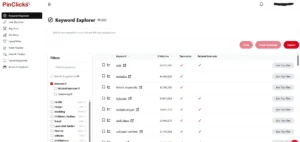
When you first log in, you’ll see the PinClicks dashboard. This is where you can access the different research tools and start exploring Pinterest data. You can see that “Nails” is the number one topic that people type into the search bar on Pinterest.
I like having everything in one place because I’m usually doing several things at once when I’m working on my blogs. I might be researching a new post, checking keywords for an existing article, or looking at what’s already performing well on Pinterest.
You don’t need to use every feature right away, though. If you’re new to Pinterest keyword research, I’d start with the Keyword Explorer.
Start With Your Main Keyword
The first thing I do is start with the main topic I’m researching. For example, for a food blogger or a food content creator, that could be “Recipe”
I can enter that keyword into PinClicks and start exploring the data around it.
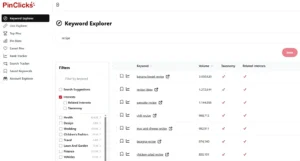
Instead of looking at just one phrase, I can see related keywords and get a much better idea of how people are searching around the topic. This is useful because the keyword I initially have in mind isn’t always the best one to focus on.
Here you can see that “banana bread recipe” is the number one searched on Pinterest (search volume: 3,030,620), and also “recipe ideas” and “pancake recipe” are very popular.
But, sometimes a related phrase has better potential. Sometimes I discover a long-tail keyword I hadn’t even considered. And sometimes the research confirms that the keyword I started with actually makes sense. Such as “homemade mac and cheese recipe” and “pineapple upside down cake recipe” get tons of searches, too!
Meaning less competition 😉

Look at Search Volume and Related Keywords
One of the things I like about using a dedicated Pinterest keyword research tool is being able to look at more than just Pinterest’s suggested searches.
PinClicks lets me explore keyword data and discover related terms that I can use when planning my Pinterest content.
When I click on “pineapple upside down cake recipe” I get the Related Interests (which are easy to copy, by the way, with just one click)
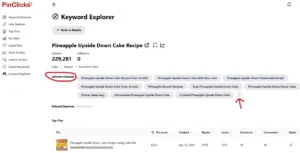
I usually look for a combination of things rather than focusing on one number. Is the keyword relevant to my blog post? Does it have enough search activity to make it interesting? Are there related keywords that could give me additional ideas? And does the search intent match what I’m actually offering?
I’m not looking for a magic keyword that guarantees traffic. I don’t think that exists. I’m looking for keywords that give me a good reason to believe that the right people are searching for this topic.
Check What Other Pins Are Doing
This is another part of keyword research that I find really useful. I don’t just want to know what people are searching for. I also want to see what Pinterest is currently showing them.
When you research a keyword, you can look at the Pins that are already performing well for that topic.
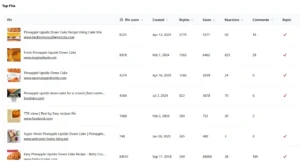
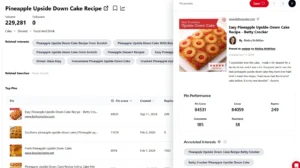
Here you see the top pins on Pinterest. Look at their Pin titles, look at the type of content they’re linking to, and look at the wording they’re using. And pay attention to the overall search results. A high Pin Score is good; those are the best performing pins at this moment.
Are most of the Pins tutorials? List posts? Checklists? Inspiration? Products?
You don’t need to copy what someone else is doing. In fact, you shouldn’t!
But seeing what is already performing well can help you understand what Pinterest users are responding to and where you might be able to create something even more useful.
This is one of the things I find particularly helpful about PinClicks. I’m not just looking for keywords. I’m also trying to understand what’s already working around those keywords.
When you click on a top pin, you can find more information on that pin, and PinClicks provides even more keywords (easy to copy and use for your own pins):
Use Your Research to Create Better Pins
Once I’ve done my research, I don’t just save the keywords somewhere and forget about them. I use them when I create my Pins.
For example, if my primary keyword is Pineapple Cake Recipe, I might use that phrase naturally in my Pin title.
Then I can use closely related terms in the description where they make sense. The important word here is naturally.
I don’t want my Pin description to look like this: Recipe, Cake, Pineapple Dessert Recipes, Dinner Ideas Easy.
Nobody wants to read that. And stuffing keywords into your Pin isn’t going to magically make it successful. Also, Pinterest doesn’t like keyword stuffing very much.
Instead, write for a real person first and make sure Pinterest can understand what the Pin is about, like: Easy Pineapple Upside-Down Cake Recipe
PinClicks Is More Than a Keyword Tool
Another reason I keep coming back to PinClicks is that it’s not limited to basic keyword research.
You can use it to research keywords, explore related terms, analyze Pins and Pinterest accounts, and keep track of your keyword performance.
That means I can use the same tool at different stages of my Pinterest strategy. I can research a topic before writing a blog post, find keywords before creating Pins, and come back later to see how those keywords are performing.
For someone who uses Pinterest regularly, having all of that information in one place can make the process much easier. And that’s really why I recommend trying it yourself.
You don’t have to decide right now if PinClicks is going to become part of your Pinterest strategy. Use the free trial, click around, try the Keyword Explorer, research a few topics from your own blog, and see if you find the information useful.
If you use Pinterest regularly to promote your blog, I think it’s worth taking a look. You might find that it saves you quite a bit of time, and that’s something I always appreciate when I’m working on my blogs.
Stop Guessing and Start Using Pinterest Keywords
Pinterest keyword research doesn’t have to be complicated. You don’t need to spend hours trying to figure out what Pinterest wants from you, and you definitely don’t need to create Pins and simply hope that someone finds them.
The more you understand what your audience is actually searching for, the easier it becomes to create content that has a purpose.
That’s really what changed things for me. I stopped thinking about Pinterest as a place where I simply shared my blog posts and started looking at it more like a search engine. I began paying attention to the words people were using, the topics they were interested in, and the type of content that was already getting attention.
And you don’t have to figure everything out at once.
Start with one blog post. Find your main Pinterest keyword. Look for a few related phrases, create a Pin around them, and see what happens. Then do it again with your next post.
PinClicks Is More Than a Keyword Tool
If you want to make the research part easier, give PinClicks a try during the free trial and see if it’s something that fits into your own workflow.
The goal isn’t to create the “perfect” Pin or find some secret keyword that suddenly sends thousands of visitors to your blog. It’s about being intentional.
You’re creating content for real people, and Pinterest is simply helping those people find it. So go ahead and do a little keyword research before you create your next Pin. You might be surprised by what you discover.
You Can Try PinClicks For Free
One thing I really like about PinClicks is that you don’t have to commit to a paid plan right away.
You can try PinClicks for free for 5 days, and the trial gives you access to the full Plus plan. You don’t need a credit card to start the trial, so you can get inside the tool, explore the different features, and see if it’s useful for your own Pinterest strategy before deciding if you want to continue.
That’s exactly what I recommend doing. Don’t just take my word for it. Try it yourself and see what you think.