

If you’ve ever dreamed of hitting big blog traffic numbers, this one’s for you. Over the past few months, I’ve been seeing incredible growth on Pinterest. And not just for this blog, I’m honestly amazed at how much this blog has taken off, but my fashion blog is thriving.
Every site I run and promote on Pinterest is doing so well. With all this new traffic coming to this blog, my email list is growing like crazy, and so is my income.
So for now, I’m making the most of how easy it is to start a new blog and grow it on Pinterest, and honestly, you should too! If you’re ready to bring in all that traffic and income, here are the amazing Pinterest strategies that I used to get started.
Disclosure: This post may contain affiliate links, meaning if you decide to purchase via my links, I may earn a commission at no extra cost to you. Please read my disclaimer for more info.
Strategies That Worked For Me
I’ve been working on a little pivot, turning this blog from an SEO-focused space into more of a Pinterest blog, all to bring in more traffic from Pinterest.
According to PinClicks, there are some solid Pinterest keywords out there. So I was testing the waters to see if those posts start gaining traction.
And after two months? Well… here’s what happened:
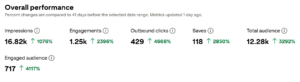
My new Pinterest account is growing like crazy!!!!
That’s wild. And it’s all with a free account on Pinterest. All that traffic? It’s already turning into real income growth. My pageviews on my blog, and my newsletter sign-ups increased. I started building my email list just a few months ago, and now it’s starting to get more serious, and people are actually reading my newsletters. It’s working!
How 100K Pageviews Turn Into Passive Income (and How to Get There!)
My mentor recently hit a huge blogging milestone; she finally crossed that magical 100,000 pageviews mark! She’s come close so many times before, 70K here, 85K there, but this year, she actually did it. And of course, I had to learn exactly how she pulled it off.
The reason behind her goal? Ad income. Her niche blogs earn money through display ads. When a reader (usually from Pinterest) lands on a post and simply scrolls through it, she earns money. They don’t even have to click or buy anything, just viewing the post counts!
It’s honestly the most passive way to earn income online. You create great blog content, grow your traffic, and let the ads do their thing. And the best part? This is something we can all do too.
So, grab your favorite tea, and let’s dive into the exact blogging strategies she used, so that we can also start using these to grow our own traffic and income this year.
Why I Changed My Mind About Ads — and You Might Too
I wanted my blog to serve as a “traditional” niche website, and that meant SEO and affiliate marketing. I never thought about using an ad platform for extra income.
I always hated ads on blogs and never read blogs with ads on them. But then my viewpoint changed when I asked other bloggers what they thought about ads, and many of them didn’t mind.
So, that convinced me to try this blogging strategy. It’s all about building a strong foundation first, and then letting the ad network help turn that traffic into real income.

Turn Your Blog Traffic Into Income: Here’s How to Get Accepted by Mediavine
You might be wondering: how do I even get accepted into an ad network like Mediavine? Well, it’s not as complicated as it sounds. Here’s the deal: Mediavine and other premium ad networks have a few requirements to make sure your blog is ready for monetization:
-
Traffic Minimums: For Mediavine, your blog needs at least 50,000 sessions per month. Other networks may have different thresholds, but traffic is key; they want to see that your blog actually reaches an audience.
-
Quality Content: Your blog should have original, helpful, and engaging content. Think evergreen posts that people will actually want to read and share.
-
Design & User Experience: Your site should be easy to navigate, mobile-friendly, and visually clean. No clutter or spammy pop-ups!
-
Consistent Posting: While they don’t expect you to post daily, having a steady flow of posts shows that your blog is active and reliable.
-
Compliance & Policies: Make sure your blog complies with privacy policies, GDPR, and other legal requirements. Networks like Mediavine take this seriously.
Once you meet these requirements, the application process is straightforward. You’ll submit your blog, answer a few questions, and wait for approval. And the best part? Once you’re in, you can start earning passive income just from the traffic you’re already growing.
Boost Your Pinterest Impressions (and Blog Traffic!) With These Tools
If you’ve been blogging for a while, you know that Pinterest can be a serious traffic booster, but only if you’re using the right strategies and tools. Over the past few months, I’ve discovered a game-changer that has helped me skyrocket my impressions and drive way more clicks to my blog.
Here’s what’s been working for me.

Pinterest Trends: Find What People Are Searching For
Pinterest Trends is a free tool that shows you what people are currently searching for on Pinterest. It’s super easy to use and gives you insight into which topics and keywords are hot right now.
By tailoring your pins to these trending topics, you can make sure your content reaches a bigger audience and ultimately drives more clicks to your blog.
I’ve been using Pinterest Trends for a while. It’s a great free tool to see what’s trending, but honestly… It’s nothing new. Everyone’s using it, and is working with the same keywords.
PinClicks: Take Your Pinterest Strategy to the Next Level
Now, this is where things get really exciting. PinClicks is a paid tool, but let me tell you, it’s been so worth it!
PinClicks helps you discover high-performing Pinterest keywords and gives you detailed insights into what’s working across the platform. Before using it, I was pinning mostly based on intuition. After using PinClicks? My impressions (and saves and clicks) shot up dramatically.
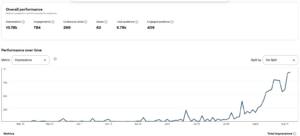
Look at that spike! This tool literally helped me reach so many more people, and all those impressions translated into a ton more clicks to my blog.
Investing in a tool like PinClicks might seem unnecessary at first, but if your goal is to grow traffic and monetize your blog, it’s one of the smartest moves you can make.
PinClicks gives you real insights into high-performing Pinterest keywords and helps you see exactly what’s working across the platform. It’s like having a roadmap for Pinterest growth. If you’re serious about making money blogging, this is a tool you can’t do without. You can try PinClicks for free.
What Is PinClicks and Why Is It So Valuable?
PinClicks is a premium Pinterest SEO tool that helps bloggers and content creators boost their visibility and drive more traffic to their blogs. Unlike Pinterest Trends, which mainly shows general trending search terms, PinClicks provides in-depth insights, such as:
– Search Volumes: Real-time data on how often a keyword is being searched.
– Pin Analytics: Information about the performance of specific pins.
– Rank Tracking: Track how your pins are performing for particular keywords.
– Account Explorer: Analyze the strategies of other successful Pinterest accounts.
With access to over 11 million keywords, you can optimize your content for the right searches and significantly increase your visibility. It’s super easy to copy and paste the keywords (including suggested keywords) into your pin and board titles and descriptions. This makes it so much easier to post great pins on Pinterest.

Why PinClicks Is Worth the Investment
While Pinterest Trends is a good starting point, PinClicks offers deeper, actionable insights that are essential for bloggers who want to grow seriously.
I’ve discovered that this tool allows you to pin more strategically and focus on keywords with high search volume and low competition. This is important if you want to stand out from the crowd. Also, Pinclicks helps me to analyze my competitors, see what keywords my competitors are using, and find ways to stand out.
With Pinclicks, you can track results and monitor your pin performance, so you can adjust your strategy as needed.
The investment in PinClicks pays off quickly through increased visibility and the extra traffic it drives to your blog. If you’re serious about earning money from your blog, PinClicks is a tool you simply can’t live without. Try PinClicks for free.
Spotting Pinterest Gold: How PinClicks Shows You What Really Works
For example, I noticed “small sewing projects” was starting to get a little buzz. But if I only looked at Pinterest Trends, I had no idea how many searches it was actually getting.
That’s where PinClicks comes in! I can type in that trend and see exactly how much traffic I could potentially get. And just like that, bingo! This keyword is pulling in tons of Pinterest traffic, and it’s a topic I can confidently write about.
Here’s a screenshot so you can see exactly what I’m talking about:
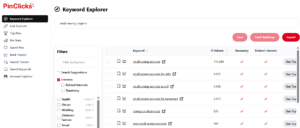
Seeing these numbers in action makes it so much easier to pick the right topics for my pins and blog posts. This is how you discover the real Pinterest traffic.
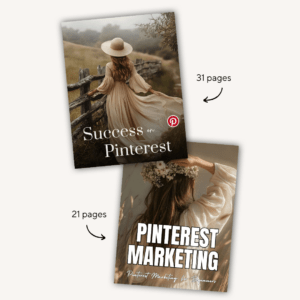
Pins & my guide success on pinterest met free pins
If you’re completely new to Pinterest, you might want to learn more about this platform. How to start a Pinterest account, and how, how much, and when to post. It’s not that difficult, but you need to start with the right settings to be ready to grow your account and monetize it.
This guide (eBook) covers all the steps and includes a few bonus pins you can use right away. These pins are editable in Canva, so they will match your branding and style.
Automate Your Pinterest Like a Pro: Tailwind & PinGenerator
Another big part of my blogging strategy is automating my pinning schedule. Manually pinning for all of my niche websites would be impossible, so I decided to use a third-party scheduler. A scheduler is perfect for bloggers (like me) who manage multiple niche sites and want to save hours each week.
There are two great pin schedulers: Tailwind and PinGenerator.
Tailwind is one of the most popular Pinterest (and Instagram) schedulers out there. It makes it super easy to plan your pins in advance, automate, and optimize your pins, with features like performance analytics and automatic posting at the best times for maximum reach.
You can easily make a lot of pins and post them on repeat. The best part is that Pinclicks is officially recognized by Pinterest as a trusted partner, so your pins are less likely to be flagged as spam. Start Tailwind for free here.
PinGenerator, on the other hand, is a newer scheduler that I’ve started using alongside Tailwind. What I love about it is how quick and simple it is to create multiple pins at once and schedule them across several boards. It helps me design and generate visually appealing and effectively positioned pins. Start PinGenerator here.
The Difference Between Tailwind and PinGenerato
The difference between Tailwind and PinGeneratoIn in short: Tailwind is more focused on the scheduling and automation of Pinterest pins, while PinGenerator is more focused on the design and creation of the pins themselves.
For me, it’s been crucial to have a scheduling tool. I can schedule pins for multiple sites, and I can even upload my Canva Pin Templates into Tailwind and PinGenerator to use.
By using these tools, I can keep my Pinterest strategy consistent, test different keywords, and make sure my pins are going out at the best times, all without spending my whole day on Pinterest. Because who has time for that? I like to spend my time wisely, so it won’t be too overwhelming.
As long as blogging and Pinterest are fun to do, I can keep going with ease. Blogging takes some time to become profitable, so I need to work smart and not get burned out. That’s why I love these tools so much, and I’m happy to pay for them to make my life so much easier.
Final Thoughts: Freedom Through Smart Systems
What I love most about combining blogging with Pinterest is the freedom it gives. Tools like Pinclicks, Tailwind, and PinGenerator make it possible to keep your traffic, and your income, flowing, even when you decide to take a step back. You can literally be sipping coffee somewhere off-grid while your pins are still driving visitors to your blog.
That’s the beauty of passive income, your hard work keeps working for you. And when you’re using the right tools, like Pinclicks (my personal secret weapon!), you’re not just keeping up… you’re staying ahead. Build your blog, automate your Pinterest, and give yourself the space to take that well-deserved week off, knowing your online business keeps running on autopilot.
Thinking about starting a blog? Here’s a step-by-step guide to help you create a blog that can actually make you money.
Are you ready to give it a try?